epos247
epos247

The Complete
POS System for
Retail & Hospitality

Powerful, easy-to-use point of sale for retail shops, restaurants, cafes, bars, and takeaways. Manage sales, stock, staff, and customers – all in one place.

Point of Sale Table Management Online Table Booking Online Ordering Stock Control Staff Management Reports & AI

30-Day Free Trial – No Card Required

🌐 Designed & built for modern businesses • responsive support team
About epos247

One system.
Everything you need.

Running a retail or hospitality business is demanding. Early mornings, late nights, and a thousand moving parts. epos247 brings everything together into one powerful, intuitive system – so you can focus on what matters: your customers.

40+
Built-in features
24/7
Cloud-based access
From £10
Per terminal / month + VAT

Who is epos247 for?

Retail Shops

Barcode scanning, stock control, supplier orders, customer accounts, and detailed sales reports. Everything a modern shop needs.

Restaurants

Table service, bookings, split bills, course management, and kitchen displays for sit-down dining.

Cafes & Coffee Shops

Quick-service ordering, loyalty programmes, self-order kiosks, and takeaway management.

Bars & Pubs

Bar tabs, fast drink ordering, waiter app, and real-time stock tracking for high-volume environments.

Takeaways

Online ordering, delivery management, order prep screens, and kitchen video displays.

Hotels & B&Bs

Accommodation bookings, room management, guest check-in, and POS charges linked to rooms.

“We replaced three separate systems with epos247. Now everything is in one place – POS, stock, staff – and we can actually see how the business is doing in real time.”

— Shop owner, neighbourhood store
2
Point of Sale

Fast, intuitive
selling made simple

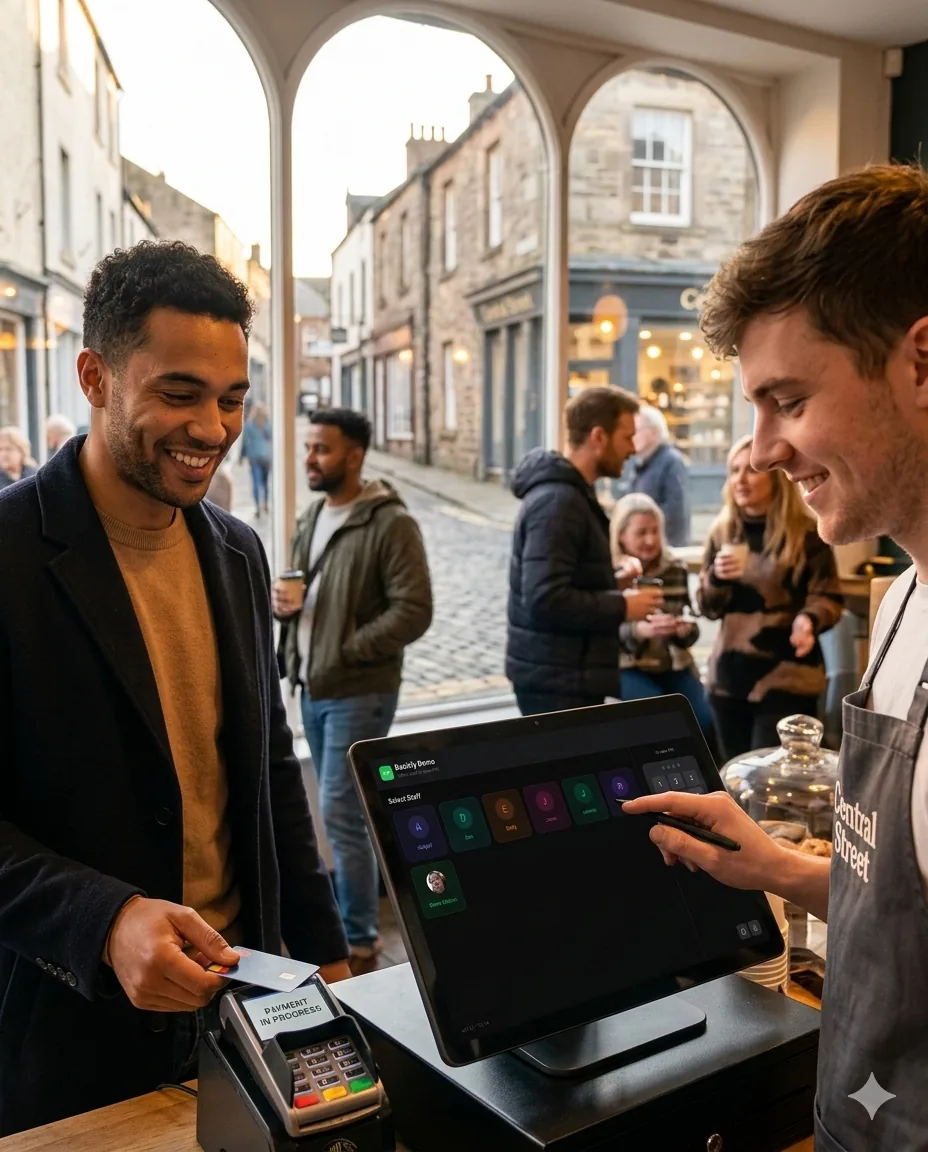
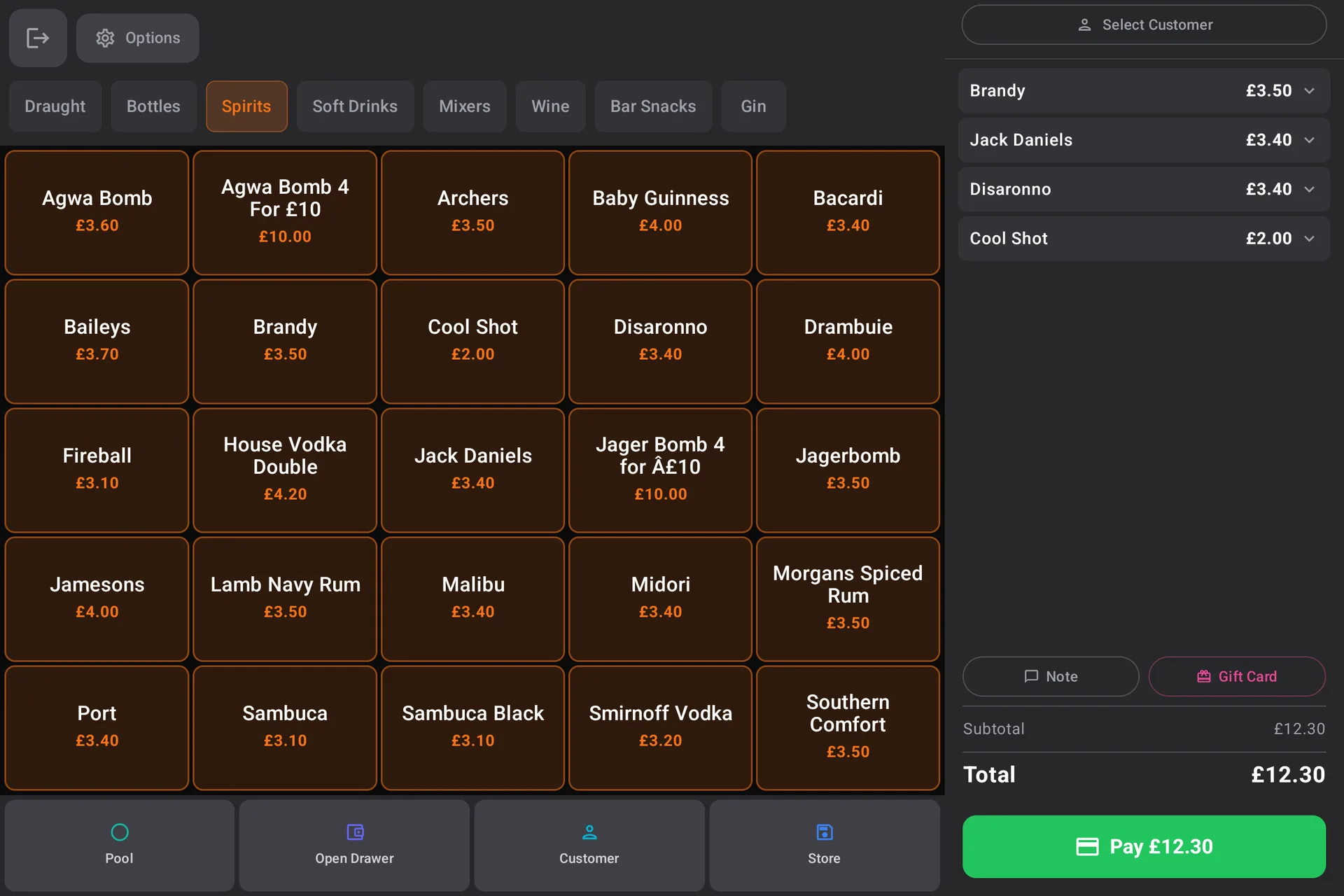
The epos247 POS is designed for speed. Your staff can process orders in seconds with a customisable product grid, quick-access buttons, and intuitive payment flow. Whether you're at the counter or tableside, every sale is effortless.

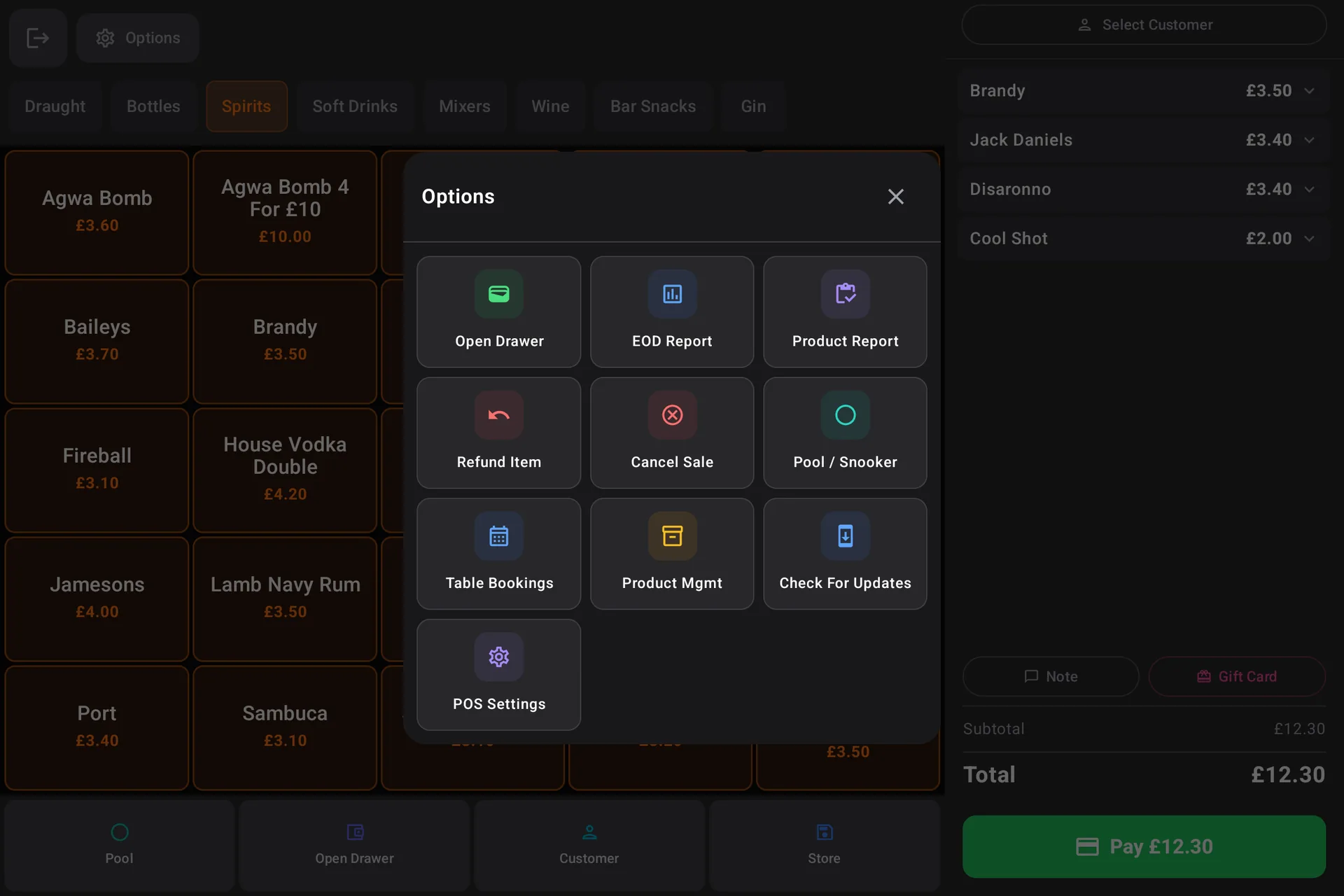
Actual epos247 POS screens
Customer paying at a busy local venue using epos247 POS epos247 POS payment and order management screen epos247 POS reporting and controls screen

Lightning Fast

Colour-coded product grid you control – categorise, recolour, reorder. Tap to add, long-press to disable an item across every till.

Flexible Payments

Cash, chip & PIN, contactless, Apple/Google Pay, gift cards and account credit. Split by item, seat, share or custom amount.

Custom Home Screen

Design your own POS layout per device. Place product buttons, function tiles or whole categories exactly where your team wants them.

Add-ons & Bolt-ons

Size options and modifiers that prompt automatically. Attach an upsell “bolt-on” group to any category and it appears under the product grid for one-tap add.

Sell By Seat

Optional per-category. With covers set, every product prompts for a seat number – making split bills, individual prep tickets, and seat-by-seat receipts effortless.

Staff PINs & Manager Override

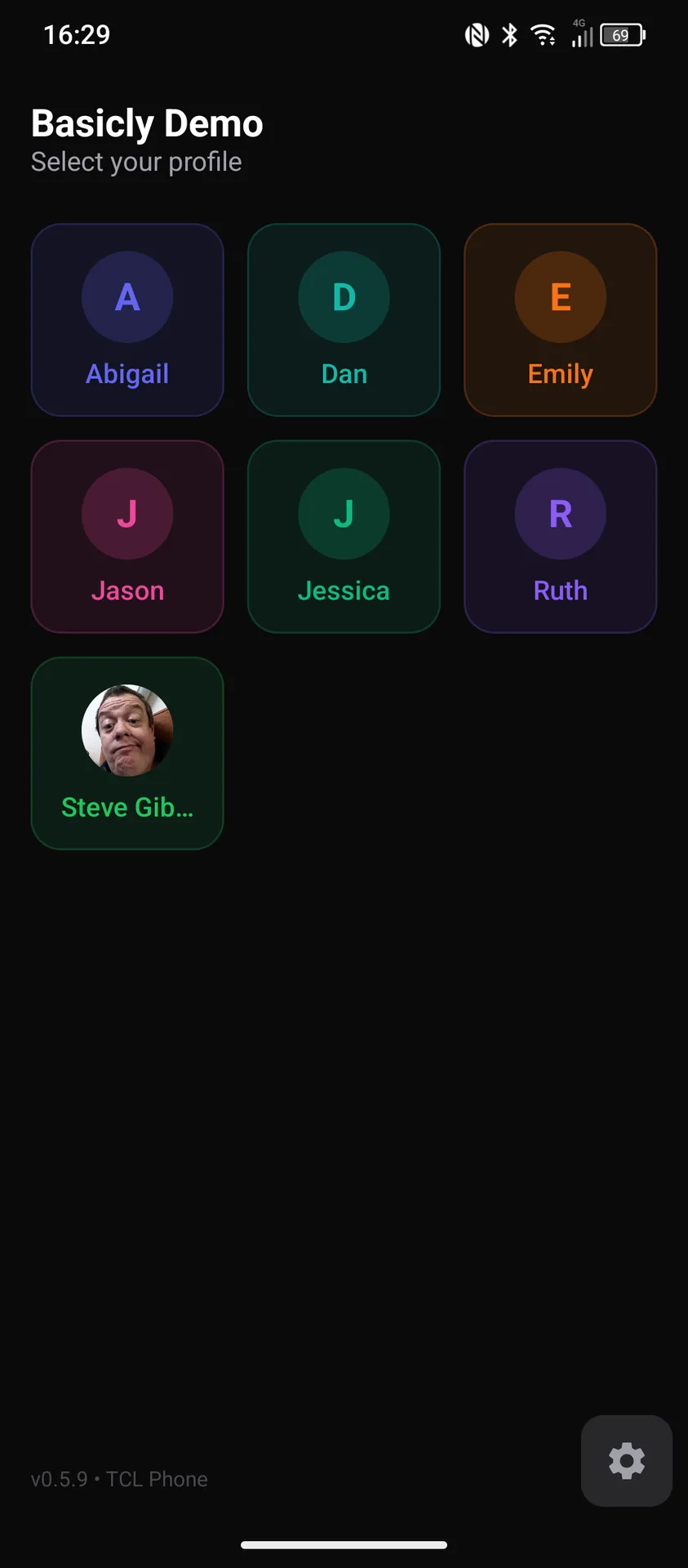
Every team member signs in with a 4-digit PIN. Sensitive actions can be set to Allowed, Manager-only, or Disabled with a fingerprint-style PIN-or-RFID override.

3
Table Management & Bookings

Your floor plan,
digitised

From a cosy café with six tables to a multi-room restaurant – manage your entire floor from one screen. See which tables are occupied, who's waiting for the bill, and where to seat the next walk-in.

Highlight: 24/7 online table bookings with automatic back office sync
Host managing reservations with tablet in a busy pub
Live floor visibility 24/7 online reservations Change covers mid-service

Drag & Drop Floor Plan

Arrange tables to match your actual layout. Multiple rooms – dining, terrace, bar – each with their own service charge and printer routing.

Online Bookings

Accept reservations from your website 24/7. Customers choose date, time, and party size. Allergen and special-request notes flow straight to the floor team.

Splits & Part Payments

Split by item, seat, share or custom amount. Bank a part payment, walk away, come back – the table reopens with the balance owed already calculated.

Bar Tabs & Change Covers

Open a tab and add items throughout the night. Adjust covers mid-service without losing the cart – service charge and per-seat splits recalculate automatically.

Booking Management

Track status from pending to seated to completed. Add notes for allergies, occasions and preferences – visible to every till and the waiter app.

Waiter App

Phone-sized table ordering with bill print relay to any POS terminal. Orders fire straight to the kitchen – no walking back to the till.

Waiter app screen 1 Waiter app screen 2 Waiter app screen 3
4
Online Ordering

Your own online
ordering website

Stop paying commission to third-party delivery apps. epos247 gives you your own branded online ordering page where customers order directly from you – and every penny goes into your till, not someone else's.

How it works

  • Your menu is automatically published from your POS – change a price once and it updates everywhere
  • Customers browse your menu, add items to their cart, and check out in seconds
  • Orders appear instantly in your POS system and on kitchen displays
  • Support for both delivery and collection, with configurable time slots
  • Branded with your logo, colours, and your own subdomain (yourname.epos247.com)
  • Accept card payments securely online – customers pay before they arrive
247
The Green Kitchen
Menu Events
STARTERS
Soup of the Day£5.50
Garlic Prawns£8.95
Bruschetta£6.50
MAINS
Ribeye Steak£22.95
Pan-Fried Salmon£16.50

“We were paying over £2,000 a month in commission to delivery apps. Now customers order through our own site, we keep 100% of the revenue, and our orders have actually increased because we promote it in-store.”

— Café owner, Bristol

Event Tickets Online

Sell tickets to events directly through your online ordering page. Customers browse upcoming events, purchase tickets, and receive QR codes by email. Attendance is tracked in real time via the back office.

5
Self-Order Kiosk

Let customers order
themselves

Self-ordering kiosks are transforming quick-service retail and hospitality. Customers browse your full menu on a touchscreen, customise their order with add-ons, and pay – all without queuing at the counter.

Why kiosks work

Bigger Orders

Customers spend 15–30% more on average when ordering via kiosk. They browse the full menu, aren't rushed, and are more likely to add extras when prompted by the screen.

Shorter Queues

Multiple kiosks serve customers simultaneously. Your counter staff can focus on food prep rather than order taking, reducing wait times dramatically.

Lower Labour Costs

Each kiosk can handle the throughput of a full-time order taker. That's a meaningful saving on staffing, especially during peak lunch hours.

Kiosk features

  • Full-screen, customer-friendly interface
  • Browse by category with product images
  • Automatic add-on and upsell prompts
  • Allergen information displayed per item
  • Dine-in or takeaway selection
  • Integrated card payment
  • Orders fire directly to kitchen display
  • Works on any Android tablet
  • Customisable with your branding
  • Queue number assignment

Tip: Place a kiosk near your entrance and watch queue anxiety disappear. Customers who would have walked past a long queue will stop and order instead.

6
Kitchen & Order Prep

From order to
plate, seamlessly

Replace noisy ticket printers with clear digital displays. Your kitchen team sees orders in real time, marks items as preparing or complete, and your front-of-house always knows the status – no shouting required.

Kitchen Video System (KVS)

Digital Display

Orders appear on screen the moment they're placed – from POS, kiosk, or online ordering. No lost tickets, no smudged ink.

Course Management

Fire starters first, then mains when your team is ready. Control the flow of service without a single verbal relay.

Timing Alerts

Orders change colour as they age. Green is fresh, amber is getting old, red needs urgent attention. At a glance, your team knows what to prioritise.

Order Prep & Printer Choices

Item-by-Item Tracking

Staff tap each item as they prepare it. Perfect for counter service – sandwiches, wraps, coffees – where you need to know which items in an order are ready.

Thermal & Dot-Matrix Printers

Use modern thermal printers, or rugged Star SP700 / Epson TM-U220 dot-matrix printers for hot/wet kitchens. Two-colour ribbon prints VOIDs in red automatically.

Beep On Print

Optional audible alert per printer so the kitchen never misses a ticket above ambient noise. Customer also gets a notification when the order is marked complete.

Order #47
2 min ago
2x Latte
1x Panini
Order #48
1 min ago
1x Burger
1x Chips
1x Coke
Order #45
8 min ago
1x Steak
1x Salmon
2x Sides
Order #42
14 min ago
3x Pizza
1x Salad
4x Drinks
7
Stock Control

Know what you have.
Control what you spend.

Wastage, over-ordering, and stock-outs cost businesses thousands every year. epos247's stock control gives you visibility and control over every item – from supplier order to customer plate.

Supplier Orders

Create purchase orders, track status, manage suppliers. Sequential order numbers, partial-receive tracking, and an over-receive guard if a delivery line exceeds 1.5× the ordered quantity.

Deliveries (Inc. Walk-In)

Receive against an order, or record a walk-in delivery without one. Confirms refresh stock levels and update the product's cost price so your margin reports stay accurate.

Stock Movements Audit

Every change – sale, delivery, return, count, wastage – is logged with timestamp, reason and source. Answer “why did this product's stock change?” in seconds, not hours.

Stock Counts & Reorder Levels

Periodic stock takes with variance detection and one-click adjustments. Set a per-product reorder level so low-stock alerts mean what you decide they mean.

Mobile Stock App

Staff run stock tasks from their phone – scan barcodes, check levels, add new products with the camera, run counts – without touching the back office.

Wastage & Cost Tracking

Log wastage with reason from any POS – stock decrements and lands in the audit ledger. Set cost prices per product to track margin and surface where you're losing money.

“We discovered we were losing over £400 a month to untracked wastage. Within the first week of using stock counts, we identified the problem and cut waste by 60%.”

— Pub manager, city centre location
8
Staff Management

Your team,
organised

Labour is one of the biggest costs in any business. epos247 helps you manage it with smart scheduling, attendance tracking, and performance insights – all built into the same system your team already uses every day.

Staff & Permissions

  • Individual 4-digit PIN per team member, with optional RFID badge
  • Custom roles – build your own permission sets, not just Staff vs Admin
  • Per-action policy: Allowed, Manager-only, or Disabled across 20+ sensitive functions
  • Track who processed each sale, refund and discount
  • Hourly rate tracking for labour-cost reports
  • Notice Board: manager-authored message shown on every staff login screen

Staff Rota & Holidays

  • Visual weekly rota builder, drag-and-drop scheduling
  • AI-powered schedule suggestions based on your trade patterns
  • Labour cost forecasting per day and week
  • Holiday Requests – staff submit, managers approve, days block out the rota automatically
  • Shift swap and availability tools
  • Hours / Labour Cost figures stay accurate even with approved holiday blocks

Clock In & Out

Time & Attendance

Staff clock in and out via the POS or rota portal with their PIN. Actual hours are paired against scheduled shifts – even past-midnight clock-outs – so payroll exports balance.

Attendance Reports

Per-staff summaries with total hours, late starts and overtime. Export as PDF for payroll. Test Device flag keeps training-till hours out of real reports.

Staff Portal

Rota on Their Phone

Staff view their rota, request holidays, see memos and check to-do lists from any phone browser. No app to install, no per-staff licence.

Staff Selfie

Team members add their own photo from the portal. These appear on the rota and POS for quick visual identification at peak.

9
Customers & Loyalty

Build lasting
relationships

Repeat customers are the lifeblood of any business. epos247 combines customer data, loyalty rewards, and direct communications so you can increase engagement, bring people back more often, and grow long-term customer value.

Customer Database

Store names, phone numbers, emails, and addresses. View complete purchase history and spending patterns at a glance.

Stamp Cards

Digital stamp cards – "buy 9 coffees, get the 10th free." Stamps are tracked automatically through the POS. No paper cards to lose.

Club Accounts

Customers pre-load a monetary balance onto their account using a membership card. Fast checkout, guaranteed repeat visits, and cash flow upfront.

Loyalty App

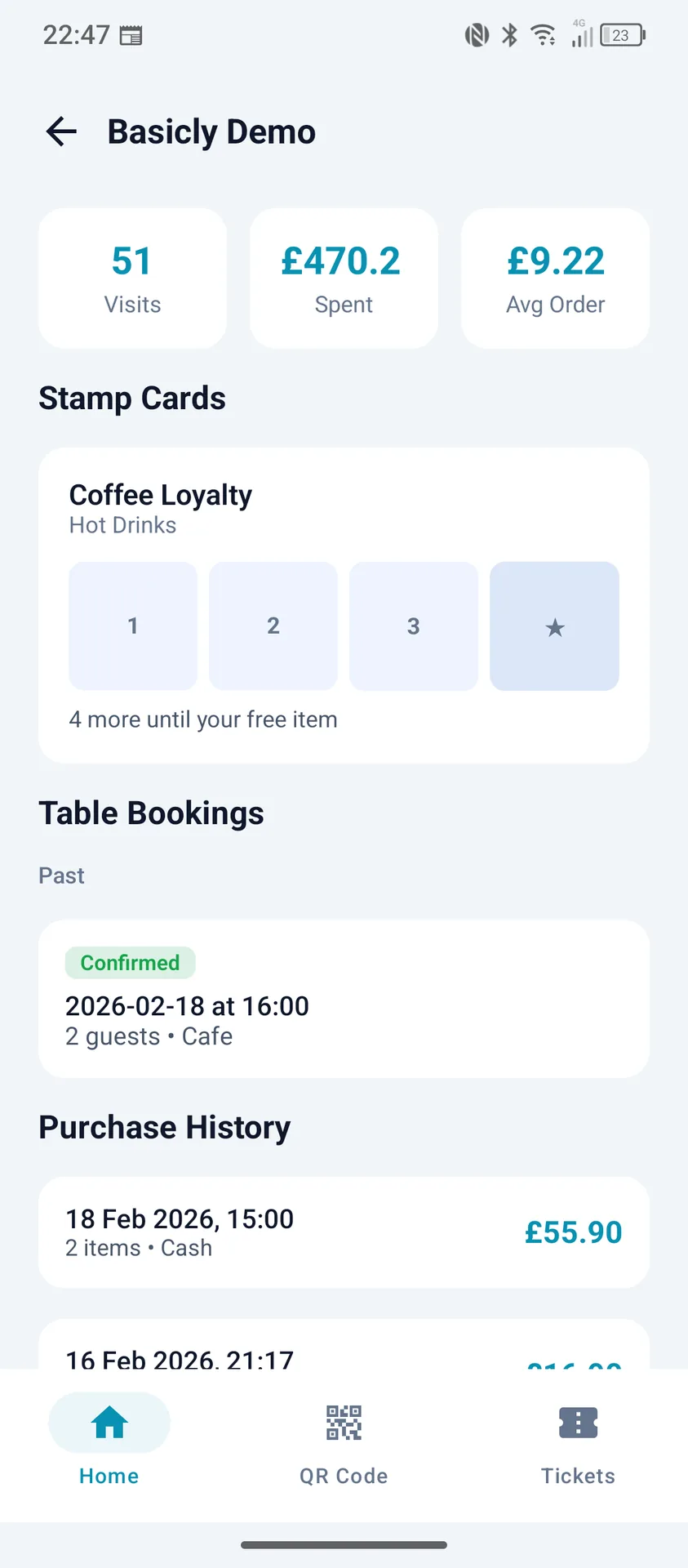
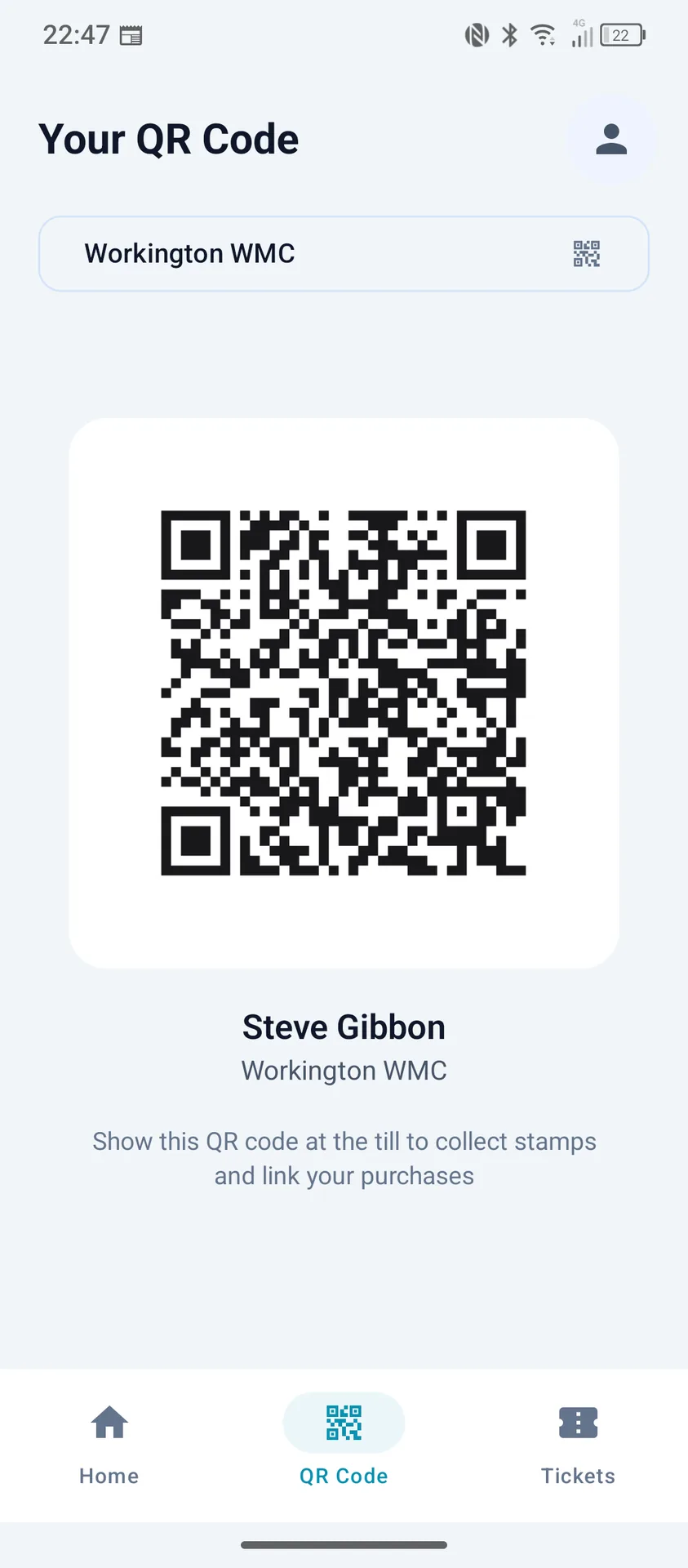
Customers use one Loyalty247 app to track points, reward progress, purchase history, digital receipts, and event tickets across participating epos247 venues.

Gift Cards

Sell and redeem gift cards through the POS. Customers can purchase them as presents – bringing new customers through your door and guaranteed revenue.

Customer Communications

Send targeted emails for rewards, birthdays, booking reminders, and event ticket QR codes. Keep your brand visible and drive repeat custom with timely messages.

Loyalty247 Customer App

One public app links customers to every epos247 business they visit. They can track points, see coffee reward progress, view order history with digital receipts, and keep event tickets in one place.

Loyalty247 points and rewards progress screen Loyalty247 purchase history and digital receipts screen Loyalty247 event tickets and wallet screen
10
Loyalty247 Growth Engine

Turn first-time buyers into
repeat local regulars

Loyalty247 gives epos247 businesses a direct line to customers after they leave the venue. Drive repeat visits with points, targeted campaigns, and personalised offers from one connected platform.

Customer Engagement That Keeps Running

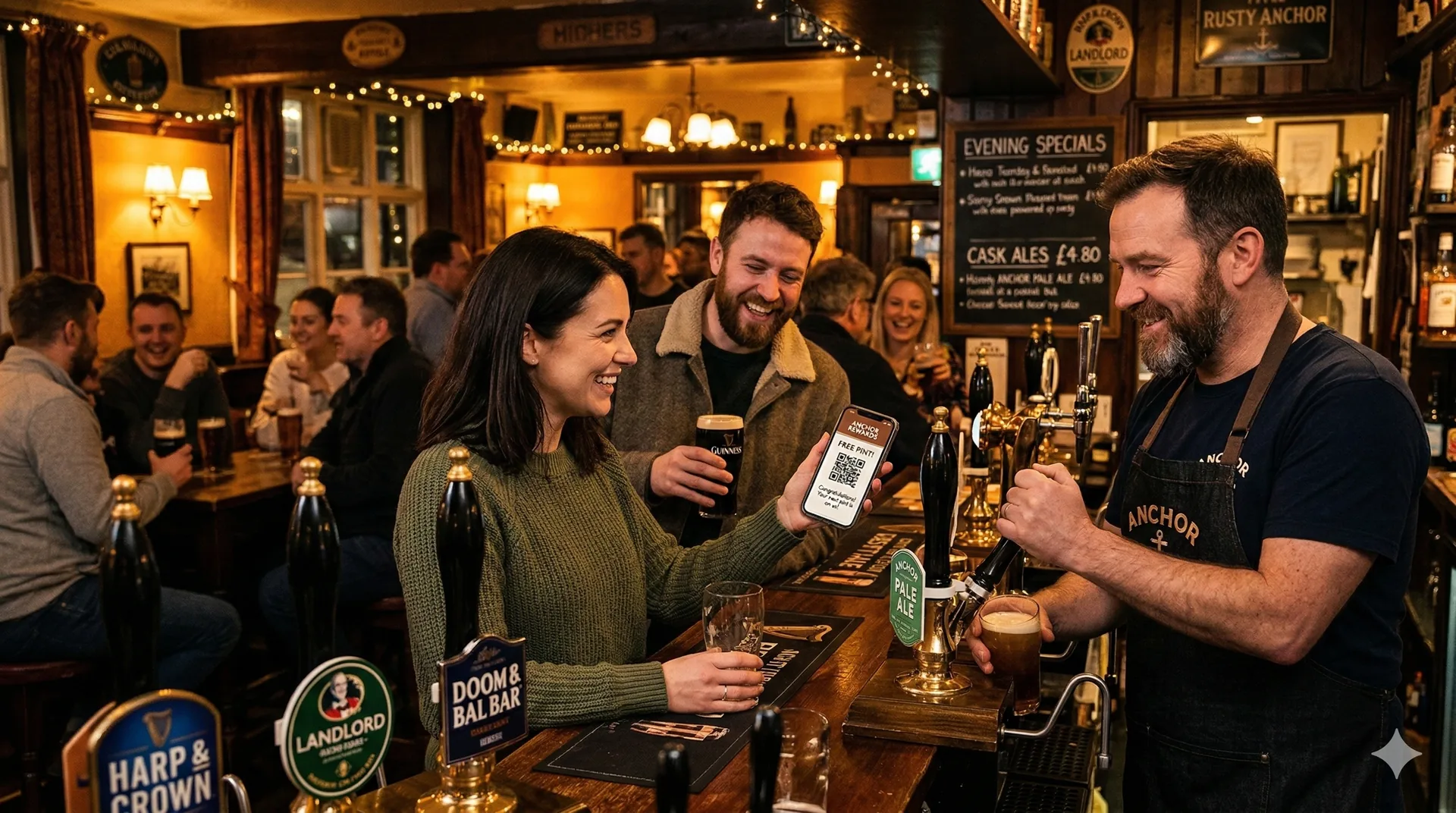
Every transaction can build a relationship. Customers track progress in the app, unlock rewards, and come back more often because the next benefit is always visible.

Busy pub customers and staff using epos247 and loyalty features

Direct Messaging & Offer Delivery

Keep your venue visible between visits with timely app-led rewards and campaign messages.

Campaigns you can run in minutes

  • Birthday treats to bring customers back in.
  • Quiet-day offers to fill off-peak periods.
  • Win-back messages for lapsed visitors.
  • VIP incentives for high-spend customers.
  • Event announcements with digital tickets.
  • Reward reminders to increase redemption.

Points, Stamps & Tiers

Configure loyalty mechanics that match your venue and margin profile.

Audience Segmentation

Target customers by behaviour, visit frequency, and spend patterns.

Clear Offer Messaging

Deliver one consistent customer experience from till to app.

Measurable Retention Impact

Track what campaigns are driving return visits and repeat spend.

Engage
Keep your brand visible between visits
Message
Send the right offer at the right time
Retain
Convert occasional spenders into loyal regulars

Cafe Sales Angle

Use loyalty to turn one-off coffee buyers into routine weekday regulars.

  • Reward each coffee toward a free drink.
  • Push 2pm offers to fill quiet periods.
  • Use points bonuses to lift pastry add-ons.

Pub Sales Angle

Keep midweek trade stronger and build deeper local loyalty.

  • Promote quiz/live event tickets in-app.
  • Run weekday drink and meal rewards.
  • Create VIP perks for high-frequency guests.

Takeaway Sales Angle

Increase repeat orders and bring customers back sooner between meals.

  • Reward every order with visible progress points.
  • Send win-back offers after inactive periods.
  • Push bundles to raise average order value.
11
Reports & AI Assistant

Data-driven
decisions

Gut feelings are useful, but data is better. epos247 gives you detailed reports on every aspect of your business, plus an AI assistant that analyses your data and offers actionable advice.

Reports

Sales Reports

Daily, hourly, weekly, and monthly breakdowns. See revenue by payment method, by staff member, by product, by category, or by time period. Filter and compare.

Best & Worst Sellers

Instantly see your top performers and your underperformers. Identify which products to promote and which to consider removing from your menu.

Staff & Tips Reports

Track sales per staff member, average transaction value, and tip distribution. Understand who's performing well and who might need extra support.

PDF Export

Download any report as a clean, professional A4 PDF document. Perfect for accountants, tax submissions, and management meetings.

AI Assistant

AI Assistant

How can I increase my sales?

Your best sellers are Margherita Pizza and Fish & Chips. Consider creating a combo deal – I can see your average transaction is £18.50. A "meal deal" at £14.99 could boost add-on sales and increase perceived value...

  • Chat naturally about your business
  • Analyses your real sales data
  • Suggests menu engineering changes
  • Offers pricing and upselling advice
  • Helps add products and set up menus
  • Bulk import menus from PDF, CSV, Excel
  • Trained on retail and hospitality best practices
11
Discounts & Promotions

Drive sales with
smart offers

Whether it's a happy hour discount, a multi-buy deal, or a mix & match promotion, epos247 handles the complexity so your staff don't have to. Discounts apply automatically at the till – no codes, no confusion.

Manual Discounts & Carry-Over

Percentage or fixed-amount discounts staff can apply at the till. Carry-Over toggle locks a multi-item discount to that exact cart snapshot – no accidental re-application later.

Multi-Buy Offers

“Buy 2 get 1 free”, “3 for £10”, or “any 2 mains 20% off.” Set the rule once and every POS applies it automatically.

Mix & Match

Combine items from different categories into a deal. “Any starter + main + drink for £15.99.” The system always picks the best price for the customer.

Scheduled Price Shifts

Happy hour from 4–6pm, breakfast menu until noon, weekend specials. Per-day schedules with manual override on POS for one-off events.

Manager controls & refunds, the way you want them

3-State Manager Override

Every sensitive action – refunds, voids, paid-outs, discount apply, EOD report – is set to Allowed, Manager-only, or Disabled per role. Manager auth modal accepts PIN or RFID badge.

Refund Item Function Bar

Pin Refund Item to a Function Bar slot for one-tap access. Refund-only carts open the payment modal cleanly – no silent gift-card auto-completes.

Discount Setup On Every POS

Manage your discounts from any till – not just back office. 3-tab modal for percentage / fixed / free-item rules. Toggle live, see effect at peak.

Sales Review & Cancel

Open a completed sale or account payment, cancel it with a reason – corrections row, audit trail, customer balance and invoices auto-rolled-back.

12
Accommodation & Events

Beyond the
shop floor

Many businesses offer more than just products and food. If you have rooms to let or events to sell, epos247 handles those too – without needing another platform.

Accommodation

For pubs with rooms, B&Bs, boutique hotels, and self-catering venues. Manage rooms, reservations, and POS room-charges from one system – or integrate with your existing PMS.

  • Define room types with amenities, pricing and rate plans
  • Visual reservation diary on Back Office and on every POS (7-day grid + reservation editor)
  • Guest check-in auto-creates a room folio for charging POS items to room
  • Bill drinks, meals and extras to room from any till; settle on departure
  • Caterbook PMS integration for venues that already use a third-party system
  • Occupancy, revenue and ADR reporting from Back Office

Ticketed Events

Running a quiz night, live music, or a special dining event? Create events, sell tickets online, and manage attendance – all within epos247.

  • Create events with date, time, venue, and capacity
  • Set ticket prices and track availability
  • Sell tickets via your online ordering page
  • QR code tickets emailed to purchasers
  • Scan QR codes for entry via phone app
  • Real-time attendance dashboard

Digital Menu Board

Display your menu on any screen – a TV behind the counter, a monitor in the window, or a digital sign by the entrance. Your menu board updates in real time whenever you change prices or products in the back office.

  • Works on any screen with a web browser
  • Auto-updates when you change your menu
  • Multiple layout options and colour themes
  • Show or hide allergen information
  • Category-by-category display with scrolling
THE GREEN KITCHEN
Starters
Soup ................. £5.50
Bruschetta ......... £6.50
Prawns .............. £8.95
Mains
Steak ............... £22.95
Salmon ............. £16.50
Burger .............. £13.95
13
Apps & Platform

One system,
every device

epos247 runs on the hardware you already have. No proprietary equipment, no expensive terminals, no vendor lock-in. Windows PCs, Android tablets, phones – they all work.

Windows POS

Full POS application for Windows 10/11 PCs and tablets. Touch-optimised interface with keyboard shortcut support.

Android POS

Full POS on Android tablets. Identical features to Windows – use whatever hardware suits your venue.

Waiter App

Table-side ordering on Android phones. Waiters take orders at the table – orders fire straight to the kitchen.

Waiter app screen 1 Waiter app screen 2 Waiter app screen 3

The Complete Ecosystem

Cloud Back Office

Manage products, reports, settings and staff from any browser – PC, Mac, tablet, phone. Multi-site tenant picker for groups; admin impersonation for support without sharing logins.

Integrated Card Terminals

Direct integrations with Teya AIO (REST + SDK fallback) and PAX POSitive (Z-report + recovery toolkit) – no double-tapping amounts, no mismatch between till and bank.

Printer Choices

Modern thermal receipt printers via USB, Ethernet or Bluetooth, plus rugged dot-matrix kitchen printers (Star SP700 / Epson) with two-colour VOID ribbon for hot/wet kitchens.

Caller ID & Customer Display

USB caller-ID hardware (CIDeasy / iDem 16) pops the customer card on incoming calls – perfect for takeaways. Optional second screen shows live cart and adverts to the customer.

Scanners & Cash Drawers

Any standard USB or Bluetooth barcode scanner, including 2D for QR / loyalty / gift cards. Cash drawers auto-open on cash sales via printer kick-out, with full cash in/out audit trail.

Resilient Offline Mode

Windows, Android and iPad keep trading through WiFi drops. A pending-sale queue plus connection-status banner means staff know what's synced – and everything backfills automatically when the network returns.

14
Why epos247

Built for service,
built for growth

epos247 is built for real operators across retail and hospitality – from VAT handling and allergen controls to contactless payments and modern service workflows.

Tax Ready

Full VAT support with clear reporting exports to keep accounts accurate and audit-ready.

Allergen Compliant

Food safety workflows are built in. Display allergen information per product across POS, kiosk, and online ordering.

Flexible Payments

Card, contactless, Apple Pay, and Google Pay support with smooth checkout across channels.

Expert Support

Real people, fast responses, and practical help from a team that understands service-led businesses.

Simple, Transparent Pricing

Lite
£10
+ VAT per terminal / month
  • Full POS – Windows, web & iPad
  • Up to 500 products in one room
  • Cash & card, receipt & cash drawer
  • Daily & weekly sales reports
  • Free updates & UK support
MOST POPULAR
Pro
£25
+ VAT per terminal / month
  • Everything in Lite, plus…
  • Unlimited products across unlimited rooms
  • Loyalty247 app, stamp cards & customer accounts
  • Table bookings with online widget
  • AI Assistant for menu setup & reporting
  • Hotel PMS integration & Xero accounting
  • Advanced & scheduled back-office reports

30-day free trial • no card required • cancel any time

Add premium apps – Stock Control, Online Ordering, Kitchen Display, Hotel Rooms, Staff Rota – only when you need them.

15
epos247
epos247

Ready to transform
your business?

Start your free 30-day trial today. No credit card required,
no commitment, and full access to every feature.

Start your free trial at

www.epos247.com

Email
sales@epos247.com
Support
support@epos247.com
Phone
POS Tables Online Ordering Stock Staff Reports Kiosk Kitchen Loyalty Events Invoicing AI Assistant
🌐 Designed, developed & supported for modern hospitality and retail