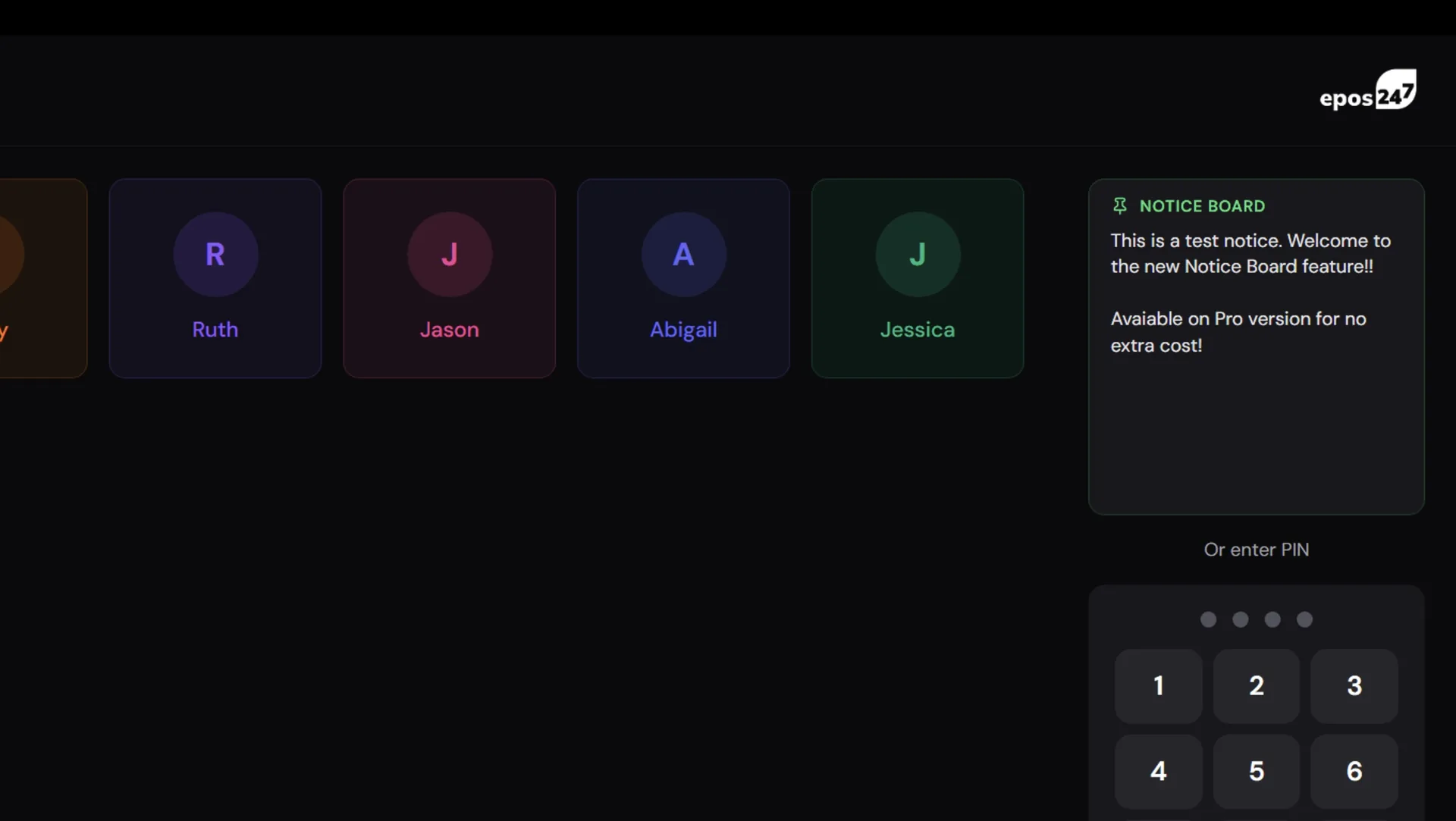
Venue managers keep running into the same small problem. There's a thing everyone on the rota needs to know today — Ben's covering section three, carvery's off tonight because the chef's short, remember to push the new cocktail menu — and there's no good place to put it. A whiteboard in the pass only works if people walk past it. A WhatsApp group only works if people check it. A sticker on the till gets ignored or falls off. And none of these catch the new starter who was off yesterday.
The till, by contrast, is the one thing every staff member touches the moment they start their shift. They log in to it. Every single time. So we put the notice board there.
One Card, Every Till
The Staff Notice Board is a new section in Back Office under Staff Management. It's two controls: an enable toggle, and a multi-line text area. Type what you want staff to see, turn the toggle on, hit Save. The message appears on every POS staff login screen at once — Web, Windows, Android and iPad — above the PIN pad, in real time. Nobody needs to restart the till. If a staff member is already on the login screen when you hit Save, the text lands on their screen within a second.
When the toggle's off, the card isn't rendered at all and the keypad sits in its normal position. So there's no "empty notice board" occupying space when you've nothing to say. Turn it on when you do; turn it off when you don't.
Why a Fixed Height?
The notice card is a fixed size on every app regardless of how much text you type. If you write three lines, the card shows three lines. If you write fifty, the card shows as much as fits, and the rest scrolls inside the card itself. The keypad never moves based on what you typed. Staff muscle memory for PIN entry is precious — we're not going to let a long manager message shove the "4" key to a new position.
Short messages, in practice, are the norm. "Team meeting 3pm", "Allergen check before first covers", "Back door locked — use the side entrance tonight". But when you do need more space — a full end-of-day briefing, a longer product launch note — the scroll handles it without re-flowing the screen.
Designed to Grow
This first cut of the feature is intentionally minimal: one notice, one toggle, one textarea. We built the data model to support more than that from day one though — multiple notices, per-day schedules, automatic cycling through a set of messages during a shift. Those layer on top without a schema change, and we'll add them as we hear which make most sense for your venue. If you'd use per-day scheduling ("Sunday briefing", "Mid-week chef's notes", "Friday push"), tell us and it moves up the list.
Available on Pro
The Notice Board is a Pro-tier feature. If your tenant's on Pro, Trial, Early Access or Partner, you'll see the new Notice Board entry in Back Office → Staff Management right away. Install the 1.3.12 update (or refresh Web POS) and the login-screen card is live.
Also In This Release
Split Bill save crash fix — an error report from a busy tenant showed saveSplitBill throwing at the cloud boundary when a legacy cart item had an undefined field. The close-split-bill UI looked like it saved but nothing actually persisted. Hardened the storeTable write to strip undefined leaves recursively so future legacy-data quirks can't reach the cloud.
Split Bill phantom duplicates — rapid double-taps on the Undo and Assign buttons could batch before state flushed, appending the same unit to the master cart twice. Rewritten as a single functional state update keyed off prev, so the batched second tap no-ops. Fixed on Windows, Web and iPad.
Android POS product grid crash — an IllegalArgumentException from Compose's LazyVerticalGrid when a duplicate product id slipped into the list. Defensive distinctBy guards at the consumer sites so this can no longer crash the activity mid-service.
Release Notes history — the Admin and Partner panels now show the full version history (106 entries back to v0.9.4). The deploy script was silently dropping the history array on every run; now it's preserved and prepended with each new release.
Available On
Notice Board and the fixes above ship on Web POS, Windows POS, Android POS and iPad POS. Install the update from the in-app updater on Windows/Android/iPad, or just refresh Web POS.